Staging Bulk Uploads With Amazon S3 Tables
Aug 17, 2026
Building a bulk upload or download API for structured data usually means picking a file format, writing parsers and serializers on both sides, coercing strings back into real types, chunking large transfers, and cleaning up half-loaded data after failures.
Direct-to-S3 uploads point at a better shape: vend a scoped credential and let the client write bytes straight to storage, no API in the middle. This works great for blob uploads, but for structured data, clients typically still send a CSV or JSON batch (e.g. Stripe’s batch jobs API).
With S3 Tables and Apache Iceberg, we can apply the same idea to structured data: vend access to a staging table instead of a blob location, and let the client write rows to it directly. No parsers, serializers, or large payloads to juggle; the Iceberg ecosystem handles that for us.
Below is an architecture that leverages Amazon S3 Tables, IAM roles, and PyIceberg for an end-to-end direct-to-Iceberg staged upload flow.
Upload flow

The API’s job shrinks to: create a place for the client to write, hand out credentials scoped to that place, and, once the client says it’s done, validate and commit. It never buffers a request body or runs a CSV parser. The heaviest thing it does is scan the staging table with Iceberg’s own reader to validate it.
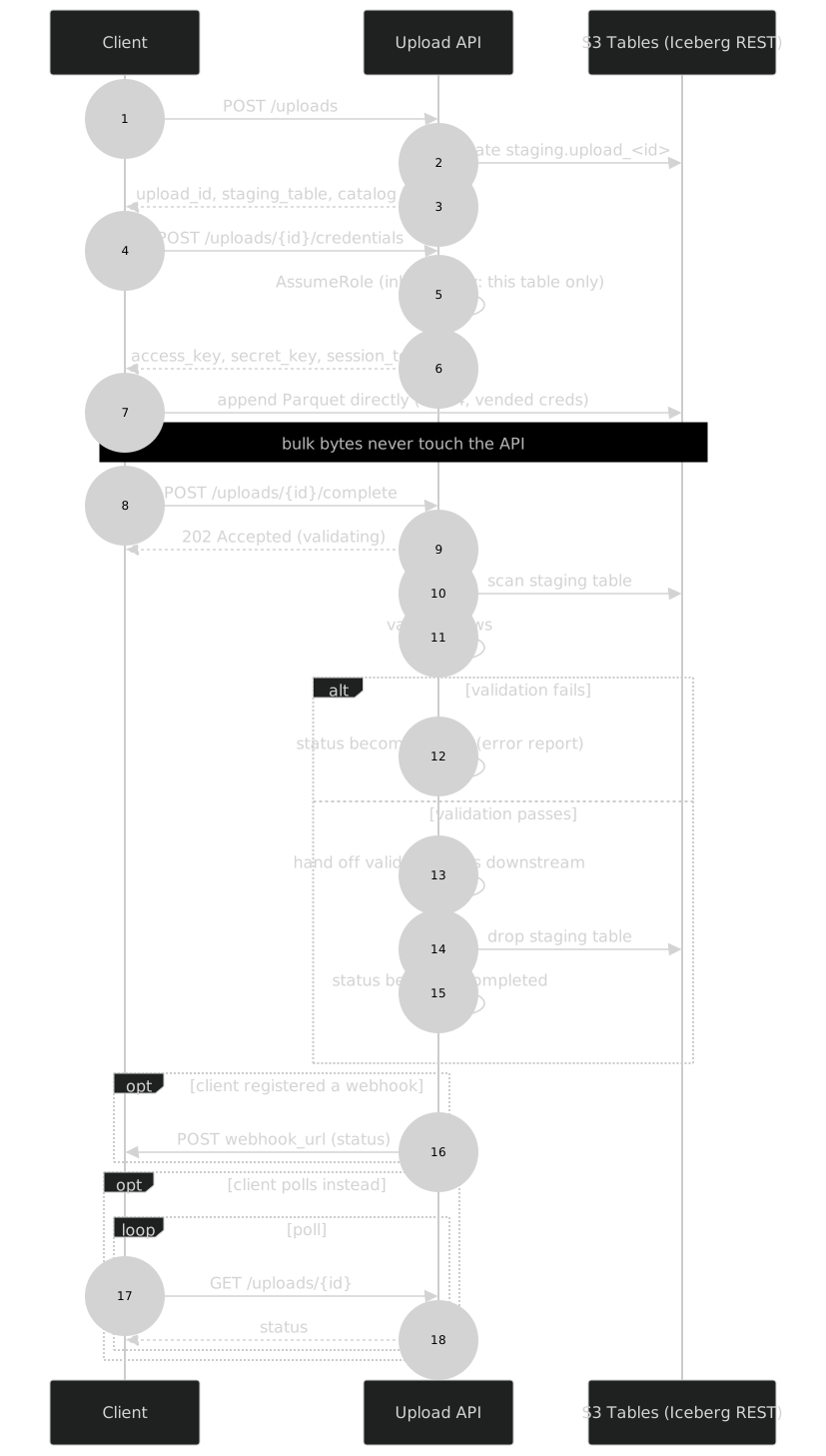
A bulk upload becomes a session: POST /uploads creates a staging table
(staging.upload_<id>) matching a specific schema, and returns connection
info for the Iceberg catalog plus the staging table’s name. Nothing has been
written yet.
Vending scoped access
The API doesn’t hand out its own AWS credentials. It calls sts:AssumeRole
on a dedicated IAM role, passing an inline session policy that scopes
the resulting credentials to exactly one resource: the staging table this
upload just created.
Simplified version of the two endpoints that do this:
from pyiceberg.catalog import load_catalog

WAREHOUSE_ARN = "arn:aws:s3tables:us-east-1:123456789012:bucket/my-table"

catalog = load_catalog("s3tables", type="rest", warehouse=WAREHOUSE_ARN)

@app.post("/uploads")
def create_upload():
    upload_id = f"upload_{uuid.uuid4().hex}"
    staging_table = f"staging.{upload_id}"
    target = catalog.load_table("payments.transactions")
    catalog.create_table(staging_table, schema=target.schema())
    return {
        "upload_id": upload_id,
        "staging_table": staging_table,
        "warehouse": WAREHOUSE_ARN,
    }

@app.post("/uploads/{upload_id}/credentials")
def vend_credentials(upload_id: str):
    session_policy = {
        "Version": "2012-10-17",
        "Statement": [{
            "Effect": "Allow",
            "Action": [
                "s3tables:GetTable",
                "s3tables:GetTableMetadataLocation",
                "s3tables:UpdateTableMetadataLocation",
                "s3tables:GetTableData",
                "s3tables:PutTableData",
            ],
            "Resource": [WAREHOUSE_ARN, f"{WAREHOUSE_ARN}/table/*"],
            "Condition": {"StringEquals": {
                "s3tables:namespace": "staging",
                "s3tables:tableName": upload_id,
            }},
        }],
    }
    creds = sts.assume_role(
        RoleArn=SESSION_ROLE_ARN,
        RoleSessionName=upload_id,
        Policy=json.dumps(session_policy),
        DurationSeconds=3600,
    )["Credentials"]
    return {
        "access_key_id": creds["AccessKeyId"],
        "secret_access_key": creds["SecretAccessKey"],
        "session_token": creds["SessionToken"],
    }
S3 Tables’ IAM actions (GetTableData, PutTableData, CreateTable, …)
take table ARNs as resources and support s3tables:namespace /
s3tables:tableName condition keys natively. The credential-vending pattern
people associate with managed Iceberg catalogs uses IAM here.
However, S3 Tables’ IAM actions don’t distinguish writing data from changing
a table’s schema, since both go through UpdateTableMetadataLocation, so
credentials scoped for appends can also evolve the table’s schema.
Since this is a staging table though, the promotion step validates
the schema before promoting it downstream.
Some catalogs like Apache Polaris
provide more granular permissions. The TABLE_WRITE_DATA privilege is kept
separate from the TABLE_WRITE_PROPERTIES privilege used for schema changes.
Writing and completing
Once the client has credentials, it configures its Iceberg client of choice and appends directly to the staging table:
from datetime import UTC, datetime

import pyarrow as pa
from pyiceberg.catalog import load_catalog

session = requests.post(f"{API}/uploads").json()
creds = requests.post(f"{API}/uploads/{session['upload_id']}/credentials").json()

catalog = load_catalog(
    "vended",
    type="rest",
    uri="https://s3tables.us-east-1.amazonaws.com/iceberg",
    warehouse=session["warehouse"],
    **{
        "rest.sigv4-enabled": "true",
        "rest.signing-name": "s3tables",
        # client.* signs REST calls, s3.* signs the actual file reads/writes.
        # Separate consumers in pyiceberg, both need the vended creds or one
        # silently falls back to whatever identity is ambient in the process.
        "client.access-key-id": creds["access_key_id"],
        "client.secret-access-key": creds["secret_access_key"],
        "client.session-token": creds["session_token"],
        "s3.access-key-id": creds["access_key_id"],
        "s3.secret-access-key": creds["secret_access_key"],
        "s3.session-token": creds["session_token"],
    },
)

staging = catalog.load_table(session["staging_table"])

# Use the schema from the staging table the API created for this upload.
staging_table_schema = staging.schema().as_arrow()

transactions = [
    {
        "transaction_id": "txn_001",
        "account_id": "acct_123",
        "amount_cents": 1299,
        "currency": "usd",
        "created_at": datetime(2026, 7, 1, 12, 0, tzinfo=UTC),
    },
    {
        "transaction_id": "txn_002",
        "account_id": "acct_456",
        "amount_cents": 4200,
        "currency": "usd",
        "created_at": datetime(2026, 7, 1, 12, 5, tzinfo=UTC),
    },
]

# PyArrow applies the table schema here, catching client-side
# mistakes before the API validates the upload on complete.
transactions_batch = pa.Table.from_pylist(
    transactions,
    schema=staging_table_schema,
)
staging.append(transactions_batch)

requests.post(f"{API}/uploads/{session['upload_id']}/complete")
That data went straight from the client to the S3 table without the API in the middle.
POST /uploads/{id}/complete is the signal that writing is done:
from pyiceberg.catalog import load_catalog

catalog = load_catalog("s3tables", type="rest", warehouse=WAREHOUSE_ARN)

@app.post("/uploads/{upload_id}/complete")
def complete_upload(upload_id: str):
    staging = catalog.load_table(f"staging.{upload_id}")
    rows = staging.scan().to_arrow()

    errors = validate(rows)  # schema, nulls, etc.
    if errors:
        return {"status": "failed", "errors": errors}

    target = catalog.load_table("payments.transactions")
    target.append(rows, snapshot_properties={"upload-id": upload_id})
    catalog.drop_table(f"staging.{upload_id}", purge_requested=True)
    return {"status": "completed"}
validate() is a background process that checks each row against the
rules for this data, and it can write its findings to a separate
table so the client can query richer validation data than just whether the
upload failed. On success, the table can be processed downstream and then
dropped.
Polling GET /uploads/{id} until it reports completed or failed is the
simplest way to show the flow, but webhooks or events are the better
production shape. The client should get notified when validation finishes,
then fetch the result.
The whole thing end to end:
Downloads
The upload and download sides are mirror images of each other:
- On upload, the client writes into an isolated table and the API reads out of it.
- On download, the API writes into an isolated table and the client reads out of it.
Either way, credentials are scoped to one table created just for that session, and nothing else is reachable through them.
# API
@app.post("/downloads")
def create_download(params: dict):
    download_id = new_id()
    download_table = create_table_for(download_id)
    creds = vend_read_only_credentials(download_table)
    populate_download_async(download_id, download_table, params)
    return {"download_id": download_id, "download_table": download_table, **creds}

def populate_download_async(download_id: str, download_table: str, params: dict):
    rows = query_data(params)
    write_rows(download_table, rows)
    notify_webhook(download_id, status="ready")
# Client
session = requests.post(
    f"{API}/downloads",
    json={"filter": "created_at >= '2026-07-01'"},
).json()
catalog = configure_catalog(session)  # vended credentials, similar to uploads

wait_until_ready(session["download_id"])  # webhook, or poll GET /downloads/{id}

rows = read_table(catalog, session["download_table"])
Conclusion
Iceberg solves the tedious parts of structured bulk APIs: typed data, atomic commits, large transfers, and clients in every major engine. S3 Tables and IAM add the access-control boundary, so the bulk data doesn’t have to move through your network or servers on initial upload or download.
This pattern gets more interesting as bulk data becomes multimodal. Instead of handing clients an S3 location and asking them to dump binary objects there, formats like Lance point toward staged datasets for embeddings, images, audio, and video. Parquet also has a proposal for a file logical type, which could let the same Iceberg pattern apply to file-like values directly. The API shape stays the same: vend narrow access to a temporary dataset, let the client move the heavy data directly, then validate and promote what landed.